Coolcatteacher

  • Subscribe to our RSS feed.
  • Twitter
  • StumbleUpon
  • Reddit
  • Facebook
  • Digg

Monday, 10 June 2013

My speaking Schedule for 2013: Indiana, Iowa, Virginia, Florida & Hawaii

Posted on 08:39 by Unknown
You are very important. If you're reading my blog, you're probably an educator of some sort. Your professional development is important. You don't want to waste your time.

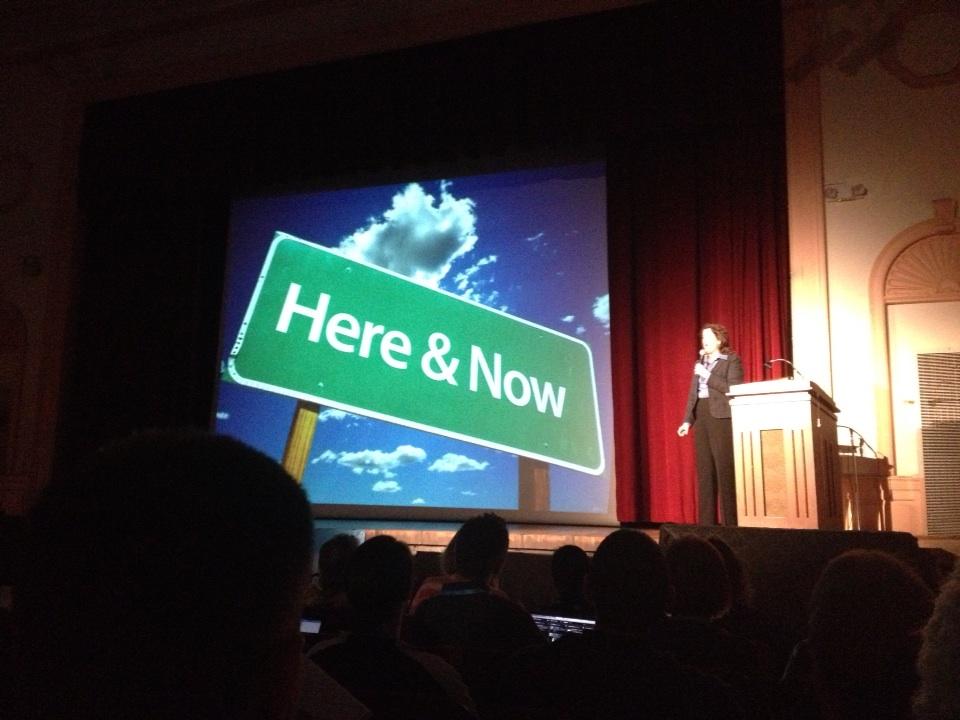
Last year being live streamed at Fall CUE.

Here's the schedule.


June 13 - Knight Time Technology Conference - Kendalville, Indiana - East Noble High School
June 18-19 - Keystone AEA Technology Integration Conference - Dubuque, Iowa
June 28 - National Conference for College & Career Readiness and Common Core State Standards - Orlando, Florida
July 18 - Tech Splash - Lebanon, Virginia
July 23-26 - Flat Classroom Live! Hawaii
December 9 - Virginia Society for Technology in Education Roanoke, Virginia

You are important. If you take the time to come to one of these conferences, I'll make sure your time is well spent. I'm excited to get out and meet you all and have some things to say that I hope will help unleash your potential, balance your life, and teach in incredible ways.

Last fall at Edscape at Eric Sheninger's school Wow.
via my friend Dr. Spike Cook's blog.

I hope that if you live in these areas, you'll try to make the time to join us at these conferences. There are so many great conferences out there! Many volunteers work tirelessly to bring you the best in professional development. Working with these amazing people throughout the country, it is stunning how much work they have to do.

It is a blessing to be included in some of these conferences each year. If you read this blog and would like to come say hello - I always give everything I have to customize the message to the audience at hand. I hope you'll tweet out that you'll be there and let me know. I'd like to help make your conference special and get a chance to say hello to the educators who take the time to converse and teach me too.


Hope to see some of you this summer and fall. If you're interested in checking availability, I have room for just a few more conferences this school year. Just contact me and let's see what we can work out.
This motto from our football team is my own motto when speaking.
I will give all I have and leave nothing else behind. I hope when
you do your presentations this summer, you'll do the same.

Thank you to all of those conferences who have invited me to join you in the past. It is a joy to be an educator. I'll give everything I have to inspire and encourage you to reach all of your students. It will be an exciting summer.
This is me and a few friends last year at ISTE 12 in
San Diego. It was AWESOME! This year I'll be
moving my son in at college and spending time
at wedding celebrations of a first cousin of mine.
ISTE 13 in San Antonio will be awesome and
I hope to pick back up and see some of you at ISTE 14 in
Atlanta! www.iste.org

Read More
Posted in | No comments

Friday, 7 June 2013

Karen Lirenman: Interview with outstanding K-2 Teacher 2013 #iste2013 @klirenman

Posted on 05:10 by Unknown

First grade teacher Karen Lirenman (@klirenman) has won the Kay L Bitter Award for innovative leadership in the K-2 classroom. She'll receive this award at ISTE 2013 in a few weeks in San Antonio. You'll want to see what the younger classroom can be by listening to what she's doing. Wow!

Karen Lirenman is a grade one teacher in Surrey, British Columbia who loves to provide her students with choice in how they learn, show, and share their knowledge. She engages them globally through video conferencing, twitter, and blogging and uses technology as seamlessly as possibly to make this all happen. She started teaching in 1992.

Professional blog http://www.learningandsharingwithmsl.blogspot.ca/
Class twitter @MsLsClass. Class blog. http://www.mslirenmansroom.blogspot.ca/

Listen to the show

Essential Questions

  • You joined Twitter in 2011 and it changed your life. How?
  • You have your first grade students create hashtags. How?
  • How do you have your first grade students Tweet without problems? Doesn't it make you nervous?
  • How did your class communicate with an author over Twitter?
  • You say that "your first graders are in control of what to share with the world," what are some of the things they choose to share with the world?
  • How do you use video conferencing? How do you pick whether to use Skype, Google Hangout or Facetime?
  • Describe how your classroom technology is setup in the classroom?
  • You describe your teaching style as one "that empowers students to choose the tool that fits best for them" how does this look? How do you give choice in the math class?
  • What are your student's favorite apps?
  • How are your students writing fiction and nonfiction stories and how do they publish their work?
  • How do you tie in your personal and professional blog in a way that protects your student's privacy?
  • If a teacher is getting iPads, but they are nervous, how does the teacher get started?

Show Links

Skype http://www.skype.com

Google Hangout: http://www.google.com/+/learnmore/hangouts/

Facetime http://www.apple.com/ios/facetime/

Draw and Tell: http://www.duckduckmoose.com/educational-iphone-itouch-apps-for-kids/draw-and-tell/

iMovie http://www.apple.com/ilife/imovie/

Educreations http://www.educreations.com/

Pop Words https://itunes.apple.com/us/app/popwords!/id472853634?mt=8

Word Wizard https://itunes.apple.com/us/app/word-wizard-talking.../id447312716?mt=8Popplet

Skitch http://evernote.com/skitch/

Bookcreator https://itunes.apple.com/us/app/book-creator-for-ipad/id442378070?mt=8

My story https://itunes.apple.com/us/app/my-story-book-maker-for-kids/id449232368?mt=8

Discovery Education app http://www.discoveryeducation.com/ipad/

Pop zoo app https://itunes.apple.com/om/app/pop-zoo-free/id610497983?mt=8

Dropbox https://www.dropbox.com/


To find out more about this podcast go to my Podcast page.

Written by Vicki Davis, author - Flattening Classrooms, Engaging Minds - Posted with Blogsy from my iPadWritten by Vicki Davis, author - Flattening Classrooms, Engaging Minds - Posted with Blogsy from my iPad
Read More
Posted in innovation, teaching, technology | No comments

Wednesday, 5 June 2013

4 Reasons I bought Microsoft Surface after wrestling alligators (guest post by Mark, my nephew)

Posted on 04:03 by Unknown
When my nephew, Mark, used his birthday money and money he'd earned from working on his Mom & Dad's gator farm to buy a Microsoft Surface, I asked him to tell me why. It is important that we cover all platforms and make up our minds. I've used Windows 8 and have a touch-enabled Lenovo m90z at home and at school and believe that Microsoft has moved forward. I've asked Mark to share here on my blog on an ongoing basis. Mark is also one of my students and came to show me his new Surface the day he bought it. Mark bought a "Windows RT Surface." When I look at the Computer information it says the manufacturer is Microsoft.
When Mark bought his surface, he brought it to school to show me right away.
by Mark, guest blogger
I bought the surface for many reasons. But these four are the main reasons why I decided to work hard for weeks on my dad’s alligator farm to earn the money needed to purchase this device.
I had a very hard decision to make. I had to decide if I wanted to buy Apple’s iPad, which was slightly cheaper, or the Surface. I had to spend a lot of time researching to decide which tablet to spend my hard earned cash on. Eventually I made up my mind and decided that the Surface was the right choice for me.

1. Portability

A reason I bought the surface is its portability. It is a very convenient size for using it on an airplane, car, or just carrying it with you on your day to day routine. In fact I am typing this up on the way to the airport! The touch or type cover, when purchased, can protect the Surface and especially the screen when you travel with it.

2. Convertibility

Another reason I bought the Surface is its ability to change from a tablet to a laptop. As a consumer, I couldn’t decide if I would rather buy a laptop or a tablet. When I found the surface, I was amazed that it wasn’t only a tablet, but could function as a laptop as well. If I want to play a game, I can use it in tablet form, but when I am ready to work, all I do is flip out the kickstand and snap in the touch cover and I am ready to work.

3. Usability

One of the great things about the surface is its ability to use the internet smoothly. Other tablets, such as the iPad, have trouble running the internet and showing flash videos and playing flash games. (I also notice now that the Surface loads YouTube videos faster than Dad's iPad). The Surface can easily surf the web, and show you that video, helping you finish that grueling school project or research that new business idea.

4. Compatibility

A great thing about the Surface is its compatibility with Office programs. Apple products and other tablets might have their own version of Word, Powerpoint, or Excel, but none of them compete with Microsoft Office. The new touch optimized version of office allows you to work casually, and then snap in the type cover to get productive.
I'm interested in purchasing a Windows phone next. (By the way I want a Nokia Lumia 928 in case someone out there is listening.)


Mark takes his Surface everywhere. He just calls it "My Surface."

Read More
Posted in innovation, technology | No comments

Tuesday, 4 June 2013

Alfred Thompson: How we can teach computer science to every age @alfredtwo

Posted on 05:07 by Unknown

Alfred Thompson (@alfredtwo) "Mr. Computer Science" spent some time talking with me and the listeners of Every Classroom matters about how we should be teaching computer science at all levels. It can be simple. Students should know how to cause the computer to do things starting at a very young age. In 10 short minutes, you can learn all about this topic and how you can put some concepts in your classroom. Are you teaching students about advanced searching? Start there.

Alfred serves on the Computer Science Teachers of America board. He's my go-to guy for questions about how to teach Computer Science. I've been a faithful reader of his blog since the first month I started blogging in December 2005. Alfred, though, isn't just a PLN resource, he's my friend. He's a good man and a great servant leader to the cause of Computer science and STEM education and is a wealth of knowledge. Take a listen, follow Alfred on Twitter, and understand how Computer Science Matters in your school.

Blog: http://blog.acthompson.net

Twitter: http://twitter.com/alfredtwo

Home Page: http://www.acthompson.net

Listen to the show

Essential questions:

  • What should elementary age students to be able to do? (curriculum directors listen up)
  • What are your favorite simple introduction to programming tools for kids in elementary? (elementary teachers)
  • What do students not understand about searching and search engines?
  • Can every child learn to program?
  • If a high school puts in AP Computer Science or Computer Science what programming languages are being used today?
  • How can use use practical examples to teach programming?
  • What is the Raspberry Pi and how can it be used in the classroom?
  • What are some examples of what you can do with the Raspberry Pi?
  • What is the computer science teacher's association? What does it do?

Show Links:

Elementary Apps & Teaching Tools

Scratch from MIT: http://scratch.mit.edu/

Alice from Carnegie Mellon: http://www.alice.org/

Kodu - Microsoft - make simple games: http://research.microsoft.com/en-us/projects/kodu/

Advanced Searching

Why search engines can't replace teachers: http://blog.acthompson.net/2013/05/why-search-engines-cant-replace.html

Advanced Google search: http://www.google.ca/advanced_search

Advanced Bing search: http://onlinehelp.microsoft.com/en-us/bing/ff808438.aspx

High School Computer Science

Small Basic: http://smallbasic.com/

Python: http://www.python.org/

Java: http://www.java.com/en/about/

The Super Cool, Super Cheap Raspberry Pi

Alfred's Blog Post about the Raspberry Pi: http://blog.acthompson.net/2013/04/new-toyraspberry-pi.html

See official Raspberry Pi Website for projects: http://www.raspberrypi.org/phpBB3/viewforum.php?f=15

Note since I recorded the show. Some people are making game consoles from the 80's with these and hooking them up to their TV's. i.e. Atari anyone? This is so cool, I gave you some bonus links below!

Lifehacker - How to make a retro gaming console for $35: http://lifehacker.com/how-to-turn-your-raspberry-pi-into-a-retro-game-console-498561192 (Great Maker project for this summer!)

Other cool articles about how people are using raspberry pi in many ways: http://lifehacker.com/tag/raspberry-pi

CSTA Information

I teach Introduction to Computer Science. I do not teach AP Computer science or extensive programming. If you teach any computer science concepts, I highly recommend you should join. Last time I checked, dues are covered by a grant if you're an educator. The newsletter is great and I learn so much about STEM every time I read it. Every school should have one member of CSTA on staff - it is that important. (I also think every school should have at least one ISTE (www.iste.org) member on staff - it is another vital STEM organization that shares best practices. These organizations have become hubs of learning and networking.)

Computer Science Teacher's Association: http://csta.acm.org/

Computer Science Education Week (December 8-14, 2013): http://www.csedweek.org/

(Add this to your school calendar now. What a great time to plan some activities. How about Raspberry Pi for Christmas? You could have a Raspberry Pi making contest!! This is a perfect time to celebrate computer science just before Christmas because you can do so many fun things. Make fun games on Kodu, etc.)

About the Every Classroom Matters show on BAM Radio Network


To find out more about this podcast go to my Podcast page.


Written by Vicki Davis, author - Flattening Classrooms, Engaging Minds - Posted with Blogsy from my iPadWritten by Vicki Davis, author - Flattening Classrooms, Engaging Minds - Posted with Blogsy from my iPad
Read More
Posted in innovation, teaching, technology | No comments

Monday, 3 June 2013

12 Secrets to Having a Truly Restful Vacation

Posted on 03:33 by Unknown
Summer is here. Whether you're reading this in June and live in the northern hemisphere or in November in Australia and south America. You know what you've got ahead.


See "School Daze: Recapturing the Teacher within" for the
story of these photos of me and my son.
I'm an idiot when it comes to being goofy in the water.
It just feels so good to be outside and be free!
You do need rest. You need to veg out. There are so many things you can do. Let's look at some things that will improve your life and your mood. When I say technology, I really mean an always-on smartphone that texts and tweets and vibrates every time that some happens to hit send. I don't mean you can't take pictures. We're talking the barrage of people OUT THERE keeping you from paying attention to the people RIGHT HERE.

Disconnecting helps you feel more like a human BEING rather than a human DOING. It is ok to just BE.


Why?

A new study shows that people who claim to be the best multitaskers AREN'T. So, if you think you can focus on all happening OUT THERE, you're lying to yourself. There is a company now to help you with your internet addiction. Even more so, your kids are likely at risk.

This was taken just the moment before I saw
a flash of light and bubbles. If you've done water sports
you know how fast it happens.
Don't be afraid to have fun because you're going to fall
if you're healthy.
Are you really UNABLE to disconnect? Is this a matrix where your spine is forever wired into this mesh of people and when you're done, you unplug and are thrown in the ground?

Take a technology-free vacation.

1. Set guidelines

If you have to check, then set a time when you won't be taking away from your family. What does disconnecting mean?

 I'll never forget the year I was in the mountains and I got a nasty tweet from an awful person. The attack was very personal, off base, and upsetting. I spent the day brooding and writing a response. 

No one can cross the fence of disconnectivity to ruin your peace of mind. You can't control THEM but you can control what you look at. You NEED To disconnect sometimes, YOU DO. What does it mean? Will you still take pics (I do?) Will you use your ereader?  Don't say technology free to your kids and take away their phones and bang away on your laptop. What does technology free look like.

Picture of a mushroom taken on a hike.
Vicki Davis
When we go to the mountains with my parents, sisters, kids, and nieces and nephews, we all check our email, etc.in the morning. Then we spend the rest of the day together.

2. Plan to go offline

I'll schedule my tweets in buffer and my blog posts as well. I'm often a better blogger when I'm out of town. This also helps others not worry and start trying to reach you because you disappeared! Communicate with those who need to know that you're going offline. 

Decide how often you're going to post and schedule those before you go out of town. My goal is that the moment I get in the car, I can curl up with a good book and start laughing at Dad's jokes.
Me and my son rafting down Little Wesser Falls.
Yahoo! I'm always scared but glad I do it.

3. Disconnect your eReader / Tablet from notifications

OK. This doesn't include a Kindle that is NOT connected to the internet. I have an old Kindle that allows me to download books.

The problem with my iPad is that if I don't turn off notifications, it will bug me all day. If your tablet is your ereader, then turn off the wi-fi. You need to read. You might not take paper books any more, especially with the prices for luggage on airplanes. Make provision to read, but be careful you're not interrupted.
Last summer all of us went ziplining. It was awesome. They don't
allow you to have cell phones on the zips for safety reasons.
They say you can't focus and you become a danger.
You're not focusing on the moment and what you're doing.
I think this applies to everything on vacation.

4. Take up Smartphones and cell phones for long periods of time

My pastor, Michael Catt, has a basket at the door of his summer vacation cabin where everyone deposits their cell phone. He pays to take his adult daughters and their families on the trip and makes it a condition of the trip. I agree.

Have you ever looked up from your laptop on vacation and seen everyone furiously texting people who aren't there? Your time as a family is your chance to connect. You can make memories. I promise that you won't remember ONE text you received or tweet you wrote. You will, however, remember going ziplining with the kids or rafting. You'll remember playing Uno or a board game. You'll remember snuggling up under blankets with a warm batch of brownies watching old episodes of The Pink Panther.

You'll remember sleeping late and staying up late. You'll remember catching fire flies and building bonfires. You'll remember when Joey sat on the flaming smore. You'll remember when Suzie ate a bug because she didn't look before grabbing a handful of raisinettes from the picnic basket. You'll even remember when the whole family started singing a crazy Pink song and you filmed it and put it on the family movie at Christmas.

When you unplug you make memories. When you stay plugged in, you just make data.

5. Take pictures but wait to upload them

I don't upload pictures until after a trip. First of all, so I don't worry about the security of my house. Secondly, so I can just be in  the moment. Thirdly, because as much as it hurts, if you put too many cool things on Facebook in a small town, people get jealous and it doesn't help you.

I know people who go to the beach every weekend and others resent it like crazy. If they just went and kept it private, NO ONE WOULD KNOW. Upload a few highlights when you're done. Plus, if you do something cool, then you start getting, TEXT MESSAGES.

This blog post is full of photographs I've taken with my Canon Rebel. It is offline, I can focus on what I'm seeing and I truly see it. I remember the snail and the mushroom and the flowers. Pictures are beautiful memories but beware lest they suck you back into an online world that will take you away from your vacation.

6. Carry a Journal

I use Evernote for everything. But it is a quick jump from Evernote journaling to Twitter for me. Typing is typing. So, I carry a journal to capture ideas (it is what writers do). I write down memories and thoughts. Then, when I get home, I scan them to evernote which handles handwriting recognition just fine. This includes pens and a small notebook in my pocket book and full size journal with at least 20 pages.

If I can avoid technology as much as possible, I'm happier. Plus, the bright light of technology can make it harder for you to go to sleep.

7. Investigate cool places

We collect "waterfalls" in my family.
We buy books about them and
go off weird places to find them.
There's something beautiful in the roar
and something calming in the shhhh
of water falling from rocks.
We use the same book every year and
mark them in the book. We take pics.
Think of something you like to
see and collect experiences.
I do use Yelp like crazy when we're traveling. I use the "nearby" feature to find cool restaurants nearby and bookstores. I love bookstores,even though I'm an ebook fanatic. I like the smell of books and the feel of them. Books are like air to me - they help me feel truly alive.

Some people check these out ahead of time and mark them on Foursquare.But be careful, it is an easy slide into full blown online engagement and offline disconnect. There have been times my kids have looked at each other and said, "Mom's gone again..." I don't like that! I'm here! I'll be here! Time is short because soon they'll be gone.

8. Go places off the grid

Do you really NEED wifi everywhere you go? I've found the best way to disconnect is to go somewhere with bad service. I always feel so much better by the second day and like a human again by the third.

9. Plan ahead to do fun things

We have older movies, board games and card games. We pack them. Sometimes the boys pack their airsoft guns or nerf guns (what a mess.) This is a great thing about going to one place each summer that is the same from the prior year. Routines often make memories.

Do you really look at the wildlife?
Kip stopped the car one year so I could
photograph these lovely flowers.
When you take pictures, you make a memory.

10. Leave your worries at home

I make a list of things that will bother me while I"m gone and do them before I go. If there is a bill to be paid, I pay it. If there is something upsetting me, I try to tackle it head on (unless it is something I have to think about.) I handle the pets. I'm not tempted, then, to make phone calls and interact too much with the outside world.

11. Plan to return to a clean house

Money is always tight but one thing I've always done is to schedule someone to clean my house while I'm gone. There is nothing nicer to come home to a clean house. Otherwise, you feel like you've got to come home and wear yourself out.

How does this help with technology? It means that when I come home, I can focus that first day on getting caught up. I don't have to panic as I drive home all upset knowing the house is a mess AND I haven't checked email.

12. Don't stress. Remember, you make the rules and this is YOUR vacation.

Stuff happens. It does. If it does, handle the problem. Get on the phone, use your laptop, etc. Talk to your family and then move on. Remember, though, that you are a gift you give your family. Unstress and be your best.

But stuff doesn't happen every day. If it does, why are you on vacation?

In Conclusion
This is your time. These precious people will not last forever. Twitter will likely live longer than some of the people you're with. If you want to live life with no regrets, intentionally walk away from things that tempt you to distraction.

Life life with intention. You can't be perfect but you can plan ahead. You can focus on the people around you instead of that cell phone that will put you in a digital jail if you let it.

Enjoy your vacation and yes, I want to see pics and I will be happy for you. (Unless you go to Alaska and if you do, I don't want to hear about it! ;-)
Read More
Posted in inspiration | No comments

Saturday, 1 June 2013

How your students can join the #quest2matter and change the world @angelamaiers

Posted on 05:03 by Unknown


The Quest 2 Matter is here! 

Listen to my interview with Agnela about the #quest2matter (Every Classroom Matters on BAM Radio)

Think of a Match.com for student ideas to improve the world and the rest of the world. That is the platform that is being built behind Quest 2 Matter. Some incredible opportunities are here for rich student participation.Whether it is on the back end helping manage and run the projects (some of my students are spending time on their summer passion projects volunteering in the movement in social media, judging, etc. Kids really are behind this movement) or submitting their quest.

I sat down recently with +Angela Maiers  (@angelamaiers) to understand the details about the Quest2Matter and how your students can participate. Watch as your students solve a problem. Help them upload their videos to the Quest 2 Matter website. The best will be selected and curated for an opportunity to mentor and be scaled globally. The Huff Post video above gives an overview about the movement from a business/ college perspective. My show focused on students and the classroom.

This is an important part of the #geniushour movement (See Engage Students and Supercharge Learning with #geniushour) It is also passion based learning and integrates well with digital storytelling.

If you're looking for the PERFECT way to end the school year THIS IS IT!

Links from the #Quest2Matter Show

Flyer - https://www.smore.com/0ruh-taking-student-genius-global
YouTube channel: https://www.youtube.com/choose2matter -- Many students including my own have been involved in the Quest2Matter. They are excited and share their stories.

FAQ about Quest2Matter and how to join: http://choose2matter.org/quest2matter-join
Rules for the Quest2Matter

Respond to the Huff Post Video Above: http://live.huffingtonpost.com/r/segment/tech-game-changers-choose2matter/519501802b8c2a258b000319

I hope you'll join in the quest2matter!
Read More
Posted in education, every classroom matters, inspiration | No comments

Daily Education and Technology News for Schools 06/01/2013

Posted on 02:30 by Unknown
  • HuffPost Live: Game Changes + Kids

    An excellent show with Angela Maiers @angelamaiers and all of the business innovators behind the choose 2 matter movement. This show on Huff post live is a great way to find out about the Quest 2 Matter movement. The quest is open until mid June - what a great way to end the school year.

    tags: education news choose2matter passionbased learning

  • TABLEIZER! Results -- Spreadsheets to HTML Tables Tool

    Very cool table tool that helps you paste in Excel and generate the HTML code to paste it onto a website (without having to know coding.)

    tags: education news blogging

  • Adding a table to a post without coding

    Very useful tip for creating tables without coding. You create the table in Excel and then use Tablelizer to create the table. One tip, however. If you're using Blogger, you'll want to copy and paste the table itself not the HTML code. I used this to create the podcast table on my page on Blogger for Every Classroom matters, my new podcast.

    tags: education news table blogging tumblr

Posted from Diigo. The rest of my favorite links are here.

Read More
Posted in | No comments
Newer Posts Older Posts Home
Subscribe to: Posts (Atom)

Popular Posts

  • 89 cool apps, sites, and tools for teaching
    Whether using tablets, droids, or devices, take time to experiment and use something new. It might just be the mood boost you need. Here are...
  • Simple ways to use mood music in your classroom to amp up learning
    Music has so many uses in the classroom. After being jolted awake by Dave Burgess ' Teach Like a Pirate wisdom - I realized that there...
  • The importance of the modern library
    Friday we took a tour of the Georgia Tech campus as my daughter went for a college day. While my son is already a freshman there, this is m...
  • Learn to Spot the Raw Material of Talent
    Gems don't start out beautiful. Most look like a dirt clod. (Photo credit: Wikipedia ) What teachers do My personal goal is to look at e...
  • I dis-like the echo chamber Facebook is becoming
    If social media has given us the gift of being afraid to speak the truth in love, then we are a sad lot indeed. Speech isn't free, it of...
  • If Common Core Standards become our straight jacket, we'll hate what education becomes #ccchat
    A sad teacher last night talked to me about how she's having to cut out two great units of study. One unit is on China and another is o...
  • Daily Education and Technology News for Schools 06/05/2012
    Help me reach my first 100 signatures! - Holt Think: Ed, Creativity, Tech, Administration Tim Holt h...
  • My Mega- News Post of #education and #edtech Goodness
    Sadly, my Diigo post- to blog feed is down and so these GREAT resources didn't post since July 3rd (and I've been blogging every day...
  • 86 Productivity Tricks, Tips, and Apps
    The wordle made from the tags and bookmarks shared in this post. Wordles are a phenomenal productivity tool and I'm starting to have s...
  • Perspective on Problems
    She was a thin little thing in a man's t-shirt two sizes too big. The crumpled dollar and some change were in her hand as she set her lo...

Categories

  • apps
  • best practices
  • blogger
  • blogging
  • book review
  • bullying
  • ccchat
  • collaboration
  • collaborativewriting
  • commentary
  • commoncore
  • creativity
  • cyberbullying
  • edapp
  • editorial
  • eduapp
  • education
  • engchat
  • english_teacher
  • eracism
  • evernote
  • every classroom matters
  • fear
  • fitness
  • flatclassroom
  • flatclassroomconference
  • global collaboration
  • guestblogger
  • highered
  • innovation
  • inspiration
  • inthenews
  • ISTE
  • iste12
  • John Gurdon
  • learning analytics
  • lessons
  • libraries
  • literacy
  • Massive open online course
  • news
  • olympics
  • opendata
  • parenting
  • productivity
  • Professional development
  • research
  • social media
  • students
  • teaching
  • technology
  • trends
  • tumblr
  • writing

Blog Archive

  • ▼  2013 (241)
    • ▼  October (11)
      • 5 reasons I’m moving from Blogger to WordPress and...
      • Daily Education and Technology News for Schools 10...
      • Join the elementary art project that will help the...
      • Daily Education and Technology News for Schools 10...
      • Daily Education and Technology News for Schools 10...
      • Daily Education and Technology News for Schools 10...
      • Daily Education and Technology News for Schools 10...
      • Daily Education and Technology News for Schools 10...
      • Daily Education and Technology News for Schools 10...
      • Daily Education and Technology News for Schools 10...
      • Creativity for kids: November 21 and every day wit...
    • ►  September (19)
    • ►  August (24)
    • ►  July (18)
    • ►  June (11)
    • ►  May (26)
    • ►  April (29)
    • ►  March (35)
    • ►  February (31)
    • ►  January (37)
  • ►  2012 (259)
    • ►  December (36)
    • ►  November (25)
    • ►  October (34)
    • ►  September (51)
    • ►  August (32)
    • ►  July (20)
    • ►  June (61)
Powered by Blogger.

About Me

Unknown
View my complete profile